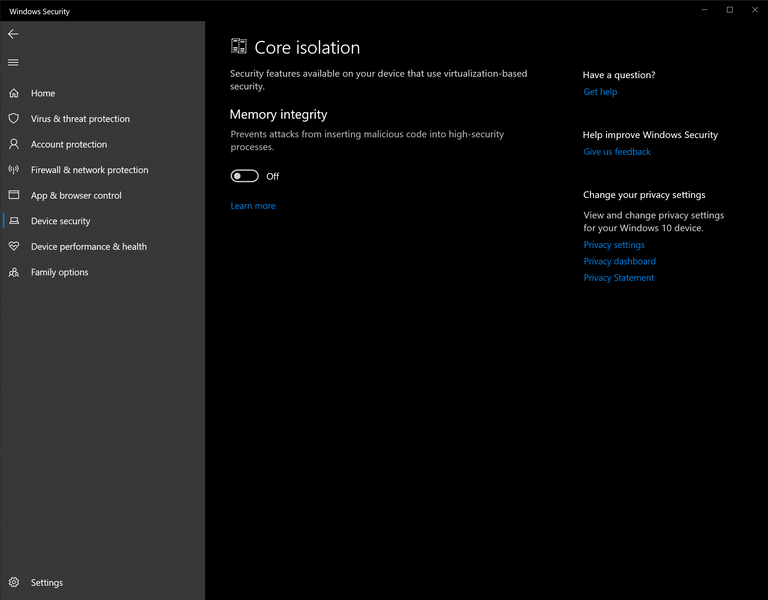
Memory Integrity
What is Memory
Integrity?
Memory Integrity (also known as Core
Isolation) is a Windows security feature that helps protect
your system by preventing untrusted or vulnerable drivers from
loading.
While this improves system security, it can also prevent software
that relies on certain drivers from working correctly. If enabled, some
products may fail to initialize or display driver-related errors.
Disable Memory
Integrity
Method 1 (Recommended)
- Open Windows Security.
- Navigate to Device Security.
- Select Core isolation details.
- Turn Memory Integrity Off.
- Restart your PC.
Method 2 (Registry)
If you’re unable to disable Memory Integrity through Windows
Security:
- Open Command Prompt as
Administrator.
- Run the following commands:
Copy
reg add "HKLM\SYSTEM\CurrentControlSet\Control\Session Manager\Memory Management" /v FeatureSettingsOverride /t REG_DWORD /d 3 /f
reg add "HKLM\SYSTEM\CurrentControlSet\Control\Session Manager\Memory Management" /v FeatureSettingsOverrideMask /t REG_DWORD /d 3 /f
- Restart your PC.
Note
Disabling Memory Integrity reduces Windows’ protection against
malicious or vulnerable kernel drivers. Only disable this feature if
required for troubleshooting or if instructed by our documentation.